Integrated Packages
Kruiger Ultimate Suite - Monthly
Kruiger HUD Combined
Kruiger HUD Combined is the complete Kruiger Labs FiveM server package, combining all five Kruiger systems into one integrated purchase.
Instead of purchasing each resource separately, Combined gives your community the complete ecosystem with the systems configured to work alongside each other.
Everything Included
Your purchase includes:
• Kruiger HUD
• Kruiger Headtags
• Kruiger Priority
• Kruiger Duty
• Kruiger Chat
• Integrated Headtag/Gangtag HUD display
• Integrated Headtag settings
• Department and organization support
• Configurable duty locations
• ACE-controlled permissions
• Priority management
• Postal navigation
• Vehicle HUD
• Seatbelt functionality
• Custom FiveM chat
• Roleplay chat commands
• Staff chat functionality
• Chat tags and settings
• Optional Discord logging
• Customer-editable configuration
• Cfx Asset Escrow protection
You do not need to purchase any of the Kruiger Standalone packages when purchasing Kruiger HUD Combined.
Kruiger HUD
Kruiger HUD provides the primary player, vehicle, and navigation interface.
The HUD loads automatically when a player joins the server.
HUD Settings
Use:
/hud
to open the HUD settings.
Players can configure supported display preferences directly in-game.
Vehicle HUD
When a player enters a supported vehicle, the vehicle HUD automatically activates.
Supported information includes features such as:
• Vehicle speed
• Speed information
• Speed limits
• Navigation information
• Vehicle indicators
• Seatbelt status
Leaving the vehicle automatically returns the HUD to its normal state.
Speed Limit Display
Use:
/togglespeed
to toggle the supported speed-limit display.
Seatbelt
The Combined package includes Kruiger HUD's vehicle seatbelt functionality.
Seatbelt information is integrated with the vehicle HUD.
Postal Navigation
Use:
/postal [postal code]
Example:
/postal 301
The system locates the configured postal and provides navigation to that location.
Recommended Postal Map
For the postal numbers displayed on your map to align with Kruiger HUD's postal system, use:
Big Daddy Scripts Postal Map
https://bigdaddyscripts.com/Products/View/2963/Postal-Map
Using another postal map or dataset may result in the displayed postal numbers not corresponding with /postal.
The Postal Map is a third-party resource and is not developed, distributed, or owned by Kruiger Labs LLC.
Kruiger Headtags
Kruiger Headtags provides configurable overhead player identification.
It can be used for:
• Staff
• Police
• Sheriff's Offices
• State Police
• Fire/EMS
• Federal Agencies
• Departments
• Subdivisions
• Gangs
• Organizations
• VIP groups
• Developers
• Management
• Custom server roles
Using Headtags
Use:
/headtag
or:
/headtags
to access the Headtag system.
Players only receive access to restricted Headtags they have permission to use.
Gang / Department Tags
Use:
/gangtag
to access available Gangtags or Department tags.
The system also supports:
/gantag
as an alternate command.
Headtag Settings
Use:
/headtagsettings
to access the integrated Headtag settings.
Players can configure supported Headtag display preferences from this interface.
Self Headtag
Use:
/showheadtagself
for the supported self-Headtag display functionality.
Adding Your Own Headtags
Server owners are not limited to the included Headtags.
Additional Headtags can be created through the customer-editable Headtags configuration.
Step 1 — Open the Headtags Configuration
Open the customer-editable configuration included with Kruiger Headtags.
Existing Headtag entries can be used as templates.
Step 2 — Create the Headtag
Copy an existing Headtag entry and modify it for your new role.
For example, you could create:
Owner
Administrator
Moderator
LSPD
BCSO
SAHP
Fire/EMS
FIB
VIP
or any other role used by your community.
Each configured tag should have its own unique identifier.
Step 3 — Configure Permissions
Headtags use FiveM ACE permissions.
Headtag permissions use:
headtag.kruiger.*
Gang/Department tags use:
gangtag.kruiger.*
Grant the corresponding permission to the appropriate FiveM principal/group.
This means simply creating a restricted tag does not automatically give everyone access to it.
Step 4 — Restart
Save your configuration and restart Kruiger Headtags or restart the server.
Authorized players can then access the new Headtag through /headtag or /headtags.
Adding Gang / Department Tags
Additional Gangtags and Department tags can also be added.
Server owners can:
- Open the Headtags configuration.
- Locate the Gangtag/Department tag configuration.
- Use an existing entry as a template.
- Create a unique entry for the new department or organization.
- Configure its display information.
- Assign its
gangtag.kruiger.*ACE permission. - Grant that permission to the correct group.
- Restart the resource.
The newly configured tag can then be accessed by authorized players through:
/gangtag
Headtag + HUD Integration
Headtags integrate directly with Kruiger HUD in the Combined package.
The player's supported Headtag/Gangtag status can be communicated to the HUD and displayed through its Tag Status interface.
Supported presentation options include settings such as:
• Position
• Scale
• Opacity
• Background
• Border
This creates a unified experience rather than operating the HUD and Headtags as unrelated scripts.
Kruiger Duty
Kruiger Duty provides department and staff duty management.
It can be used for law enforcement, emergency services, federal agencies, staff teams, organizations, and other server-defined departments.
Going On/Off Duty
Players can use:
/duty
to access the duty system where permitted.
Servers can also configure physical duty locations.
When a player approaches a configured duty point, they can interact using:
E
to access the duty interface.
Players can then change between supported:
On Duty
and:
Off Duty
states.
Creating Duty Locations
Duty locations are configurable by the server owner.
This means your community can place duty access where it actually makes sense for your server.
Examples include:
• Police stations
• Sheriff's offices
• Highway patrol stations
• Fire stations
• Hospitals
• Federal buildings
• Staff areas
• Organization headquarters
The customer-editable duty configuration/data controls the locations used by your server.
Existing configured duty points can be used as examples when adding additional locations.
Adding More Departments
You are not limited to the departments included by default.
Kruiger Duty is designed so server owners can configure additional departments for their community.
Examples could include:
• LSPD
• BCSO
• SAHP
• Fire/EMS
• FIB
• DHS
• IAA
• Corrections
• Dispatch
• Server Staff
• Custom organizations
Adding a Department
1. Open the Duty Configuration
Open the customer-editable Kruiger Duty configuration.
Locate the configured departments.
2. Use an Existing Department as a Template
Existing department entries show the structure expected by the system.
Create another entry following that structure and give the department its own unique identifier.
3. Configure Department Access
Configure the appropriate access/permissions for the new department.
Only players who should have access to that department should receive its required permissions.
4. Add Duty Locations
Configure one or more duty points for the department where required.
For example, a Sheriff's Office could have duty points at multiple stations while Fire/EMS could have them at multiple firehouses.
5. Save and Restart
Save the configuration and restart Kruiger Duty or your server.
The new department can then use the configured Duty system.
Duty Setup
Authorized administrators also have access to:
/dutysetup
This functionality is intended for authorized server management rather than normal players.
Servers should restrict administrative Duty functionality through the included permission system.
Duty + Headtags Integration
Because both resources are included in Combined, Kruiger Duty can work alongside Kruiger Headtags.
This allows duty information and supported Headtag functionality to be used as part of the same ecosystem.
For example, your departments can have their own configured Headtags/Gangtags while also using Kruiger Duty for On/Off Duty management.
Kruiger Priority
Kruiger Priority provides server-wide roleplay priority management.
Use:
/priority
to access the Priority Management interface.
Authorized users can manage the server's current Priority status.
Supported states can include:
• Priority Available
• Priority Active
• Priority On Hold
• Priority Cooldown
Changes are synchronized so the appropriate Priority information updates for players.
Priority Permissions
Priority management is permission controlled.
The permission namespace uses:
kruiger.priority.*
Server owners can decide which staff members or groups are authorized to control Priority.
Regular players should not be given Priority management permissions unless desired.
Kruiger Chat
Kruiger Chat replaces the standard chat experience with a custom FiveM chat system built for roleplay and community servers.
It includes roleplay messaging, advertisements, social communication, player settings, Chat Tags, staff functionality, chat management, and optional Discord logging.
Roleplay Chat Commands
/me
Use:
/me [message]
to describe an action performed by your character.
Example:
/me reaches into their pocket and removes their ID.
/gme
Use:
/gme [message]
for the supported global ME-style functionality.
/do
Use:
/do [message]
to describe a scene, condition, or roleplay detail.
Example:
/do The front windshield would be shattered.
Communication Commands
/social
Use:
/social
for the supported social messaging functionality.
/sms
Use:
/sms
for the supported SMS-style messaging functionality.
/ad
Use:
/ad
for the configured advertisement system.
Server owners can configure the supported behavior and access for these systems.
Chat Settings
Use:
/chatsettings
to access player Chat settings.
Players can customize supported Chat preferences through this interface.
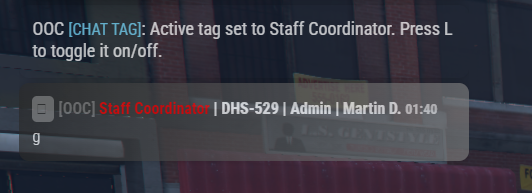
Chat Tags
Use:
/chattag
to access the Chat Tag functionality.
Chat Tags can be configured and permission-controlled by the server.
This can be used for identifiers such as:
• Owner
• Staff
• Developer
• Department
• VIP
• Supporter
• Custom community roles
Chat Visibility
Players can use:
L
for the supported Chat visibility/display functionality.
This gives players quick access to the Chat display controls without entering another command.
Chat History
Use:
F1
for the supported Chat history scrolling functionality.
This makes it easier to review previous messages when Chat is moving quickly.
Staff Chat & Management
Kruiger Chat includes functionality intended for authorized staff members.
Supported functionality includes:
• Staff messaging
• Chat management
• Chat locking
• Permission-controlled staff features
Staff functionality should be restricted to your authorized staff groups.
Discord Logging
Kruiger Chat supports optional Discord webhook logging.
Discord logging is not required.
If enabled, the server owner supplies their own Discord webhook through the customer-editable configuration.
Kruiger Labs does not require customers to send their server's Chat logs to a Kruiger Labs webhook.
How the Complete Package Works Together
HUD
Provides the primary player, vehicle, navigation, speed, seatbelt, and settings interface.
Headtags
Provides overhead player identification and permission-controlled Headtags/Gangtags.
Duty
Handles On/Off Duty status and configurable department duty locations.
Priority
Provides server-wide roleplay Priority management.
Chat
Provides the server's roleplay-focused Chat and communication system.
Combined Integration
The systems are packaged together so communities can build their server around one Kruiger ecosystem rather than purchasing and configuring unrelated resources from multiple products.
Main Player Commands
/hud — HUD settings
/postal [code] — Postal navigation
/togglespeed — Toggle supported speed-limit display
/headtag — Access Headtags
/headtags — Access Headtags
/gangtag — Access Gang/Department tags
/gantag — Alternate Gangtag command
/headtagsettings — Headtag settings
/showheadtagself — Supported self-Headtag functionality
/duty — Duty system
/priority — Priority management
/me — Character action
/gme — Global ME-style functionality
/do — Roleplay scene/detail
/social — Social functionality
/sms — SMS functionality
/ad — Advertisement functionality
/chatsettings — Chat settings
/chattag — Chat Tags
Additional Controls
E — Interact with configured Duty locations
L — Supported Chat visibility functionality
F1 — Supported Chat history functionality
Administrative functionality such as /dutysetup should only be available to authorized users.
Installation
1. Install the Package
Extract the included resources into your FiveM resources directory.
Keep the supplied resource structure intact.
2. Configure HUD
Configure the customer-editable HUD options.
3. Configure Headtags
Configure your Headtags, Gangtags, Department tags, and corresponding ACE permissions.
4. Configure Departments
Configure Kruiger Duty with the departments and organizations used by your server.
5. Configure Duty Locations
Add the duty points needed for your departments.
6. Configure Priority
Configure the Priority system and determine which groups can manage it.
7. Configure Chat
Configure your Chat options, permissions, Chat Tags, and optional Discord logging.
8. Configure ACE Permissions
Review all supplied permission examples and grant access only to the appropriate FiveM principals/groups.
9. Install Postal Map
If you want matching visible postals, install the recommended Big Daddy Scripts Postal Map.
10. Add Resources to server.cfg
Add the included resources using the appropriate ensure entries supplied with the package.
11. Restart & Test
Restart your server and verify:
• HUD loads
• Vehicle HUD works
• Seatbelt functionality works
• Postal navigation works
• Headtags work
• Custom Headtag permissions work
• Gang/Department tags work
• Duty points work
• Departments can clock in/out
• Priority works
• Priority permissions work
• Chat loads
• Roleplay Chat commands work
• Chat Tags work
• Staff Chat permissions work
Customer Customization
Combined is designed to remain configurable even though supported core implementation files are protected through Cfx Asset Escrow.
Server owners can configure supported customer-facing options including:
• HUD settings
• Headtags
• Gang/Department tags
• Headtag permissions
• Departments
• Duty locations
• Duty permissions
• Priority permissions
• Chat settings
• Chat Tags
• Optional Discord logging
You are not restricted to only the departments, Headtags, or organizations included by default.
Framework Requirements
Kruiger HUD Combined does not require:
• ESX
• QBCore
• Qbox
No external database is required for normal operation of the included systems.
Cfx Asset Escrow
Kruiger HUD Combined is distributed using Cfx Asset Escrow.
Supported core implementation files are protected while designated customer-editable configuration remains available for server customization.
A valid Cfx entitlement is required to run the protected resource.
Standalone vs Combined
Standalone Packages
Designed for customers who only need one particular Kruiger system.
HUD, Priority, Headtags, Duty, and Chat can be purchased separately.
Kruiger HUD Combined
The complete package containing:
Kruiger HUD + Kruiger Headtags + Kruiger Priority + Kruiger Duty + Kruiger Chat
One purchase gives you the entire current Kruiger FiveM resource ecosystem.
Requirements
• Working FiveM server
• Cfx.re account/entitlement
• Correct ACE configuration for restricted functionality
• Recommended postal map if matching visible postals are desired
Version
Kruiger HUD Combined v1.0.0
Includes:
HUD v1.0.0
Headtags v1.0.0
Priority v1.0.0
Duty v1.0.0
Chat v1.0.0
Support
Need assistance installing or configuring the package?
Join the Kruiger Labs Discord:
https://discord.gg/DbnPHsU9jg
When requesting technical support, please provide relevant console errors and explain what was happening when the issue occurred.
Developed by Kruiger Labs LLC
Kruiger Ultimate Suite - Lifetime
Kruiger HUD Combined
Kruiger HUD Combined is the complete Kruiger Labs FiveM server package, combining all five Kruiger systems into one integrated purchase.
Instead of purchasing each resource separately, Combined gives your community the complete ecosystem with the systems configured to work alongside each other.
Everything Included
Your purchase includes:
• Kruiger HUD
• Kruiger Headtags
• Kruiger Priority
• Kruiger Duty
• Kruiger Chat
• Integrated Headtag/Gangtag HUD display
• Integrated Headtag settings
• Department and organization support
• Configurable duty locations
• ACE-controlled permissions
• Priority management
• Postal navigation
• Vehicle HUD
• Seatbelt functionality
• Custom FiveM chat
• Roleplay chat commands
• Staff chat functionality
• Chat tags and settings
• Optional Discord logging
• Customer-editable configuration
• Cfx Asset Escrow protection
You do not need to purchase any of the Kruiger Standalone packages when purchasing Kruiger HUD Combined.
Kruiger HUD
Kruiger HUD provides the primary player, vehicle, and navigation interface.
The HUD loads automatically when a player joins the server.
HUD Settings
Use:
/hud
to open the HUD settings.
Players can configure supported display preferences directly in-game.
Vehicle HUD
When a player enters a supported vehicle, the vehicle HUD automatically activates.
Supported information includes features such as:
• Vehicle speed
• Speed information
• Speed limits
• Navigation information
• Vehicle indicators
• Seatbelt status
Leaving the vehicle automatically returns the HUD to its normal state.
Speed Limit Display
Use:
/togglespeed
to toggle the supported speed-limit display.
Seatbelt
The Combined package includes Kruiger HUD's vehicle seatbelt functionality.
Seatbelt information is integrated with the vehicle HUD.
Postal Navigation
Use:
/postal [postal code]
Example:
/postal 301
The system locates the configured postal and provides navigation to that location.
Recommended Postal Map
For the postal numbers displayed on your map to align with Kruiger HUD's postal system, use:
Big Daddy Scripts Postal Map
https://bigdaddyscripts.com/Products/View/2963/Postal-Map
Using another postal map or dataset may result in the displayed postal numbers not corresponding with /postal.
The Postal Map is a third-party resource and is not developed, distributed, or owned by Kruiger Labs LLC.
Kruiger Headtags
Kruiger Headtags provides configurable overhead player identification.
It can be used for:
• Staff
• Police
• Sheriff's Offices
• State Police
• Fire/EMS
• Federal Agencies
• Departments
• Subdivisions
• Gangs
• Organizations
• VIP groups
• Developers
• Management
• Custom server roles
Using Headtags
Use:
/headtag
or:
/headtags
to access the Headtag system.
Players only receive access to restricted Headtags they have permission to use.
Gang / Department Tags
Use:
/gangtag
to access available Gangtags or Department tags.
The system also supports:
/gantag
as an alternate command.
Headtag Settings
Use:
/headtagsettings
to access the integrated Headtag settings.
Players can configure supported Headtag display preferences from this interface.
Self Headtag
Use:
/showheadtagself
for the supported self-Headtag display functionality.
Adding Your Own Headtags
Server owners are not limited to the included Headtags.
Additional Headtags can be created through the customer-editable Headtags configuration.
Step 1 — Open the Headtags Configuration
Open the customer-editable configuration included with Kruiger Headtags.
Existing Headtag entries can be used as templates.
Step 2 — Create the Headtag
Copy an existing Headtag entry and modify it for your new role.
For example, you could create:
Owner
Administrator
Moderator
LSPD
BCSO
SAHP
Fire/EMS
FIB
VIP
or any other role used by your community.
Each configured tag should have its own unique identifier.
Step 3 — Configure Permissions
Headtags use FiveM ACE permissions.
Headtag permissions use:
headtag.kruiger.*
Gang/Department tags use:
gangtag.kruiger.*
Grant the corresponding permission to the appropriate FiveM principal/group.
This means simply creating a restricted tag does not automatically give everyone access to it.
Step 4 — Restart
Save your configuration and restart Kruiger Headtags or restart the server.
Authorized players can then access the new Headtag through /headtag or /headtags.
Adding Gang / Department Tags
Additional Gangtags and Department tags can also be added.
Server owners can:
- Open the Headtags configuration.
- Locate the Gangtag/Department tag configuration.
- Use an existing entry as a template.
- Create a unique entry for the new department or organization.
- Configure its display information.
- Assign its
gangtag.kruiger.*ACE permission. - Grant that permission to the correct group.
- Restart the resource.
The newly configured tag can then be accessed by authorized players through:
/gangtag
Headtag + HUD Integration
Headtags integrate directly with Kruiger HUD in the Combined package.
The player's supported Headtag/Gangtag status can be communicated to the HUD and displayed through its Tag Status interface.
Supported presentation options include settings such as:
• Position
• Scale
• Opacity
• Background
• Border
This creates a unified experience rather than operating the HUD and Headtags as unrelated scripts.
Kruiger Duty
Kruiger Duty provides department and staff duty management.
It can be used for law enforcement, emergency services, federal agencies, staff teams, organizations, and other server-defined departments.
Going On/Off Duty
Players can use:
/duty
to access the duty system where permitted.
Servers can also configure physical duty locations.
When a player approaches a configured duty point, they can interact using:
E
to access the duty interface.
Players can then change between supported:
On Duty
and:
Off Duty
states.
Creating Duty Locations
Duty locations are configurable by the server owner.
This means your community can place duty access where it actually makes sense for your server.
Examples include:
• Police stations
• Sheriff's offices
• Highway patrol stations
• Fire stations
• Hospitals
• Federal buildings
• Staff areas
• Organization headquarters
The customer-editable duty configuration/data controls the locations used by your server.
Existing configured duty points can be used as examples when adding additional locations.
Adding More Departments
You are not limited to the departments included by default.
Kruiger Duty is designed so server owners can configure additional departments for their community.
Examples could include:
• LSPD
• BCSO
• SAHP
• Fire/EMS
• FIB
• DHS
• IAA
• Corrections
• Dispatch
• Server Staff
• Custom organizations
Adding a Department
1. Open the Duty Configuration
Open the customer-editable Kruiger Duty configuration.
Locate the configured departments.
2. Use an Existing Department as a Template
Existing department entries show the structure expected by the system.
Create another entry following that structure and give the department its own unique identifier.
3. Configure Department Access
Configure the appropriate access/permissions for the new department.
Only players who should have access to that department should receive its required permissions.
4. Add Duty Locations
Configure one or more duty points for the department where required.
For example, a Sheriff's Office could have duty points at multiple stations while Fire/EMS could have them at multiple firehouses.
5. Save and Restart
Save the configuration and restart Kruiger Duty or your server.
The new department can then use the configured Duty system.
Duty Setup
Authorized administrators also have access to:
/dutysetup
This functionality is intended for authorized server management rather than normal players.
Servers should restrict administrative Duty functionality through the included permission system.
Duty + Headtags Integration
Because both resources are included in Combined, Kruiger Duty can work alongside Kruiger Headtags.
This allows duty information and supported Headtag functionality to be used as part of the same ecosystem.
For example, your departments can have their own configured Headtags/Gangtags while also using Kruiger Duty for On/Off Duty management.
Kruiger Priority
Kruiger Priority provides server-wide roleplay priority management.
Use:
/priority
to access the Priority Management interface.
Authorized users can manage the server's current Priority status.
Supported states can include:
• Priority Available
• Priority Active
• Priority On Hold
• Priority Cooldown
Changes are synchronized so the appropriate Priority information updates for players.
Priority Permissions
Priority management is permission controlled.
The permission namespace uses:
kruiger.priority.*
Server owners can decide which staff members or groups are authorized to control Priority.
Regular players should not be given Priority management permissions unless desired.
Kruiger Chat
Kruiger Chat replaces the standard chat experience with a custom FiveM chat system built for roleplay and community servers.
It includes roleplay messaging, advertisements, social communication, player settings, Chat Tags, staff functionality, chat management, and optional Discord logging.
Roleplay Chat Commands
/me
Use:
/me [message]
to describe an action performed by your character.
Example:
/me reaches into their pocket and removes their ID.
/gme
Use:
/gme [message]
for the supported global ME-style functionality.
/do
Use:
/do [message]
to describe a scene, condition, or roleplay detail.
Example:
/do The front windshield would be shattered.
Communication Commands
/social
Use:
/social
for the supported social messaging functionality.
/sms
Use:
/sms
for the supported SMS-style messaging functionality.
/ad
Use:
/ad
for the configured advertisement system.
Server owners can configure the supported behavior and access for these systems.
Chat Settings
Use:
/chatsettings
to access player Chat settings.
Players can customize supported Chat preferences through this interface.
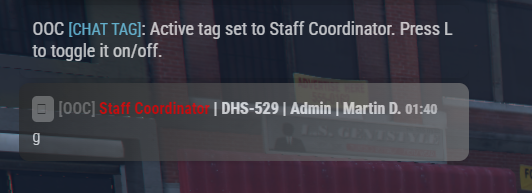
Chat Tags
Use:
/chattag
to access the Chat Tag functionality.
Chat Tags can be configured and permission-controlled by the server.
This can be used for identifiers such as:
• Owner
• Staff
• Developer
• Department
• VIP
• Supporter
• Custom community roles
Chat Visibility
Players can use:
L
for the supported Chat visibility/display functionality.
This gives players quick access to the Chat display controls without entering another command.
Chat History
Use:
F1
for the supported Chat history scrolling functionality.
This makes it easier to review previous messages when Chat is moving quickly.
Staff Chat & Management
Kruiger Chat includes functionality intended for authorized staff members.
Supported functionality includes:
• Staff messaging
• Chat management
• Chat locking
• Permission-controlled staff features
Staff functionality should be restricted to your authorized staff groups.
Discord Logging
Kruiger Chat supports optional Discord webhook logging.
Discord logging is not required.
If enabled, the server owner supplies their own Discord webhook through the customer-editable configuration.
Kruiger Labs does not require customers to send their server's Chat logs to a Kruiger Labs webhook.
How the Complete Package Works Together
HUD
Provides the primary player, vehicle, navigation, speed, seatbelt, and settings interface.
Headtags
Provides overhead player identification and permission-controlled Headtags/Gangtags.
Duty
Handles On/Off Duty status and configurable department duty locations.
Priority
Provides server-wide roleplay Priority management.
Chat
Provides the server's roleplay-focused Chat and communication system.
Combined Integration
The systems are packaged together so communities can build their server around one Kruiger ecosystem rather than purchasing and configuring unrelated resources from multiple products.
Main Player Commands
/hud — HUD settings
/postal [code] — Postal navigation
/togglespeed — Toggle supported speed-limit display
/headtag — Access Headtags
/headtags — Access Headtags
/gangtag — Access Gang/Department tags
/gantag — Alternate Gangtag command
/headtagsettings — Headtag settings
/showheadtagself — Supported self-Headtag functionality
/duty — Duty system
/priority — Priority management
/me — Character action
/gme — Global ME-style functionality
/do — Roleplay scene/detail
/social — Social functionality
/sms — SMS functionality
/ad — Advertisement functionality
/chatsettings — Chat settings
/chattag — Chat Tags
Additional Controls
E — Interact with configured Duty locations
L — Supported Chat visibility functionality
F1 — Supported Chat history functionality
Administrative functionality such as /dutysetup should only be available to authorized users.
Installation
1. Install the Package
Extract the included resources into your FiveM resources directory.
Keep the supplied resource structure intact.
2. Configure HUD
Configure the customer-editable HUD options.
3. Configure Headtags
Configure your Headtags, Gangtags, Department tags, and corresponding ACE permissions.
4. Configure Departments
Configure Kruiger Duty with the departments and organizations used by your server.
5. Configure Duty Locations
Add the duty points needed for your departments.
6. Configure Priority
Configure the Priority system and determine which groups can manage it.
7. Configure Chat
Configure your Chat options, permissions, Chat Tags, and optional Discord logging.
8. Configure ACE Permissions
Review all supplied permission examples and grant access only to the appropriate FiveM principals/groups.
9. Install Postal Map
If you want matching visible postals, install the recommended Big Daddy Scripts Postal Map.
10. Add Resources to server.cfg
Add the included resources using the appropriate ensure entries supplied with the package.
11. Restart & Test
Restart your server and verify:
• HUD loads
• Vehicle HUD works
• Seatbelt functionality works
• Postal navigation works
• Headtags work
• Custom Headtag permissions work
• Gang/Department tags work
• Duty points work
• Departments can clock in/out
• Priority works
• Priority permissions work
• Chat loads
• Roleplay Chat commands work
• Chat Tags work
• Staff Chat permissions work
Customer Customization
Combined is designed to remain configurable even though supported core implementation files are protected through Cfx Asset Escrow.
Server owners can configure supported customer-facing options including:
• HUD settings
• Headtags
• Gang/Department tags
• Headtag permissions
• Departments
• Duty locations
• Duty permissions
• Priority permissions
• Chat settings
• Chat Tags
• Optional Discord logging
You are not restricted to only the departments, Headtags, or organizations included by default.
Framework Requirements
Kruiger HUD Combined does not require:
• ESX
• QBCore
• Qbox
No external database is required for normal operation of the included systems.
Cfx Asset Escrow
Kruiger HUD Combined is distributed using Cfx Asset Escrow.
Supported core implementation files are protected while designated customer-editable configuration remains available for server customization.
A valid Cfx entitlement is required to run the protected resource.
Standalone vs Combined
Standalone Packages
Designed for customers who only need one particular Kruiger system.
HUD, Priority, Headtags, Duty, and Chat can be purchased separately.
Kruiger HUD Combined
The complete package containing:
Kruiger HUD + Kruiger Headtags + Kruiger Priority + Kruiger Duty + Kruiger Chat
One purchase gives you the entire current Kruiger FiveM resource ecosystem.
Requirements
• Working FiveM server
• Cfx.re account/entitlement
• Correct ACE configuration for restricted functionality
• Recommended postal map if matching visible postals are desired
Version
Kruiger HUD Combined v1.0.0
Includes:
HUD v1.0.0
Headtags v1.0.0
Priority v1.0.0
Duty v1.0.0
Chat v1.0.0
Support
Need assistance installing or configuring the package?
Join the Kruiger Labs Discord:
https://discord.gg/DbnPHsU9jg
When requesting technical support, please provide relevant console errors and explain what was happening when the issue occurred.
Developed by Kruiger Labs LLC